Building a modern data lakehouse doesn't have to be complex. DuckLake is revolutionizing how we think about data lakes by combining the simplicity of Parquet files with the power of DuckDB, creating an integrated data lake and catalog format that delivers advanced features without traditional complexity.
What Problem Does DuckDB Solve?
Traditional data warehouses and data lakes each have their limitations. Data warehouses are fast for analytics but expensive and rigid, while data lakes are cheap and flexible but slow for queries. DuckLake bridges this gap by:
What is DuckLake?
DuckLake is an open, standalone format from the DuckDB team that delivers advanced data lake features without traditional lakehouse complexity. It uses Parquet files and your SQL database to create a seamless data management experience.
Unlike other lakehouse solutions that require complex infrastructure, DuckLake keeps things simple:
• Our Dataset: NY Taxi Data
Throughout this guide, we'll use NY Taxi Parquet data (yellow_trip_data_2025-01) from the NYC TLC Trip Record Data to demonstrate DuckLake's capabilities. This real-world dataset showcases how DuckLake handles:
Getting Started: Installation
• Installing DuckDB
First, you need to install DuckDB. Visit DuckDB Installation for detailed instructions.
Windows/Terminal:
winget install DuckDB.cliLinux/macOS:
curl https://install.duckdb.org | sh• Installing DuckLake
INSTALL ducklake;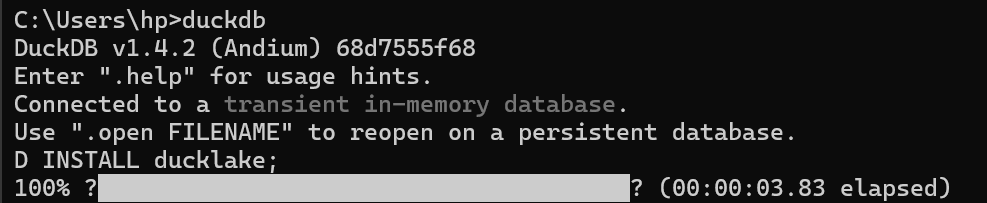
• Configuration
To use DuckLake, you need to make two decisions: which metadata catalog database you want to use and where you want to store those files. In the simplest case, you use a local DuckDB file for the metadata catalog and a local folder on your computer for file storage.
• Creating a New Database
DuckLake databases are created by simply starting to use them with the ATTACH statement.
ATTACH 'my_ducklake.ducklake' AS my_ducklake (TYPE DUCKLAKE);
USE my_ducklake;
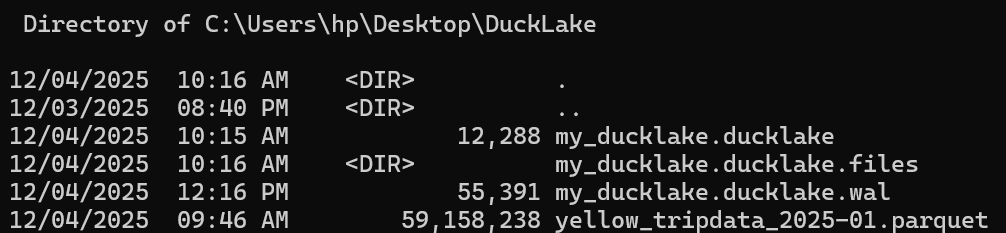
This will create a file my_ducklake.ducklake, which is a DuckDB database with the DuckLake schema. We also use USE so we don't have to prefix all table names with my_ducklake. Once data is inserted, this will also create a folder my_ducklake.ducklake.files in the same directory, where Parquet files are stored.
Create a DuckLake Table
Let's create our first DuckLake table using the yellow_trip_data_2025-01 parquet file from the NYC TLC Trip Record Data. Note that we could also use a CSV file, but in this case we had a ready parquet file so we used it. The commands shown include:
FROM glob('my_ducklake.ducklake.files/**/*')FROM 'my_ducklake.ducklake.files/**/*.parquet' LIMIT 10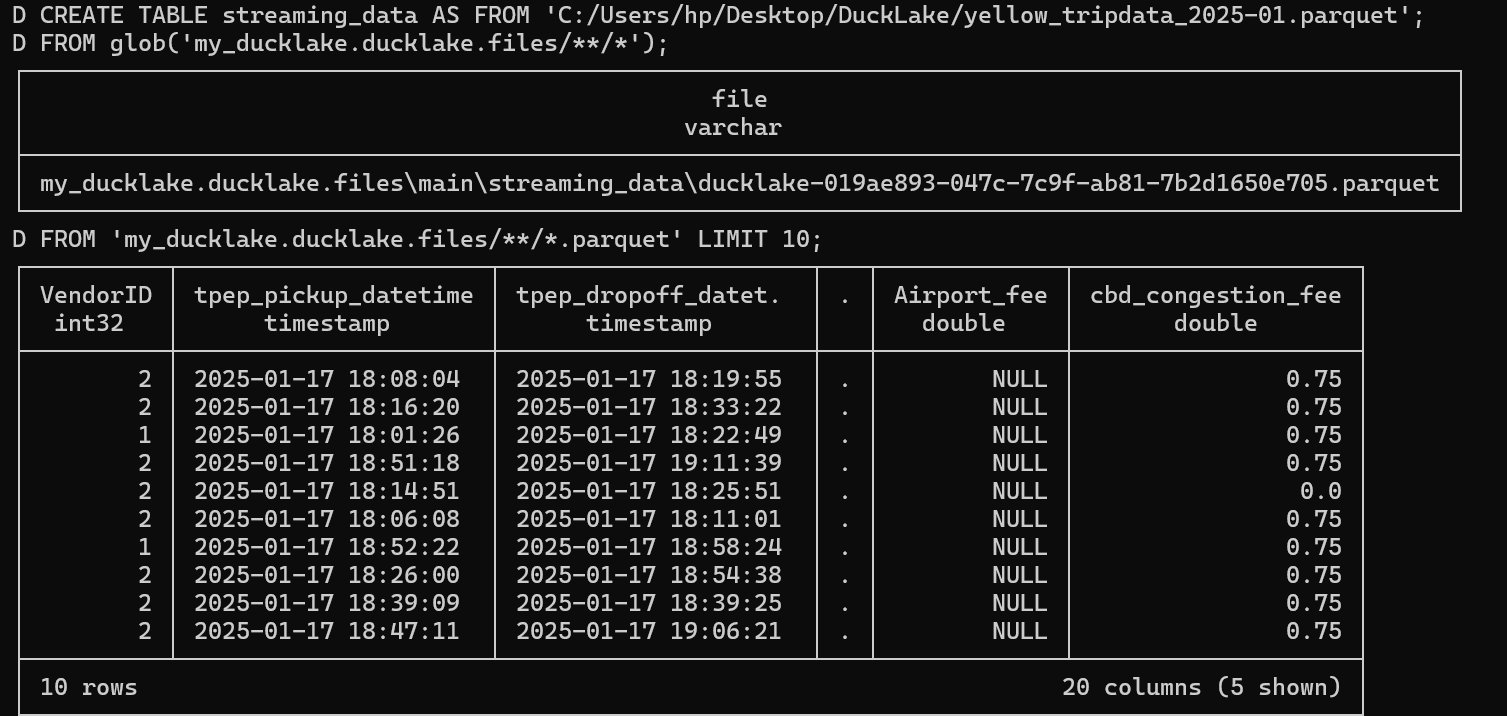
Read a DuckLake Table
Now let's examine our table structure using the DESCRIBE command. The DESCRIBE streaming_data command reveals important details about each column including column_type, null constraints, keys, and other metadata.
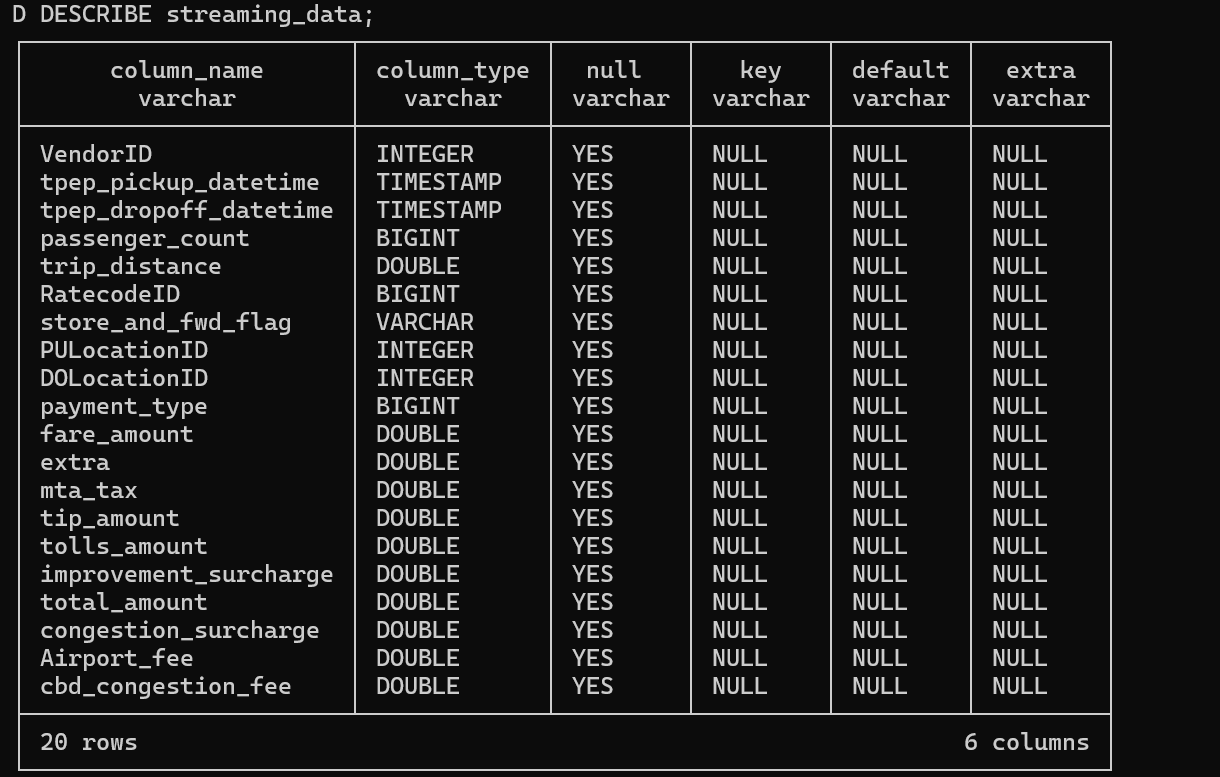
The beauty of DuckLake is its simplicity - you can start with existing Parquet files and immediately benefit from lakehouse features. Notice how we're doing a SELECT FROM WHERE just like we're working on a relational database and querying information, that's the power of DuckLake's integration.
Read and Update Column Values
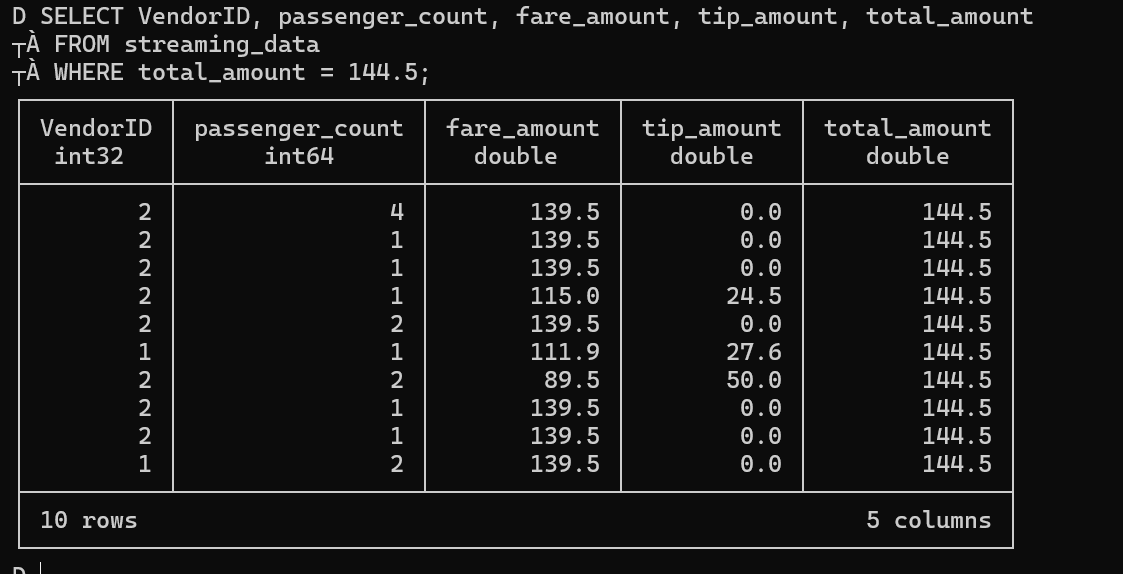
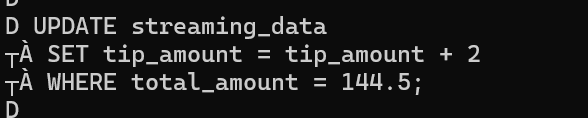
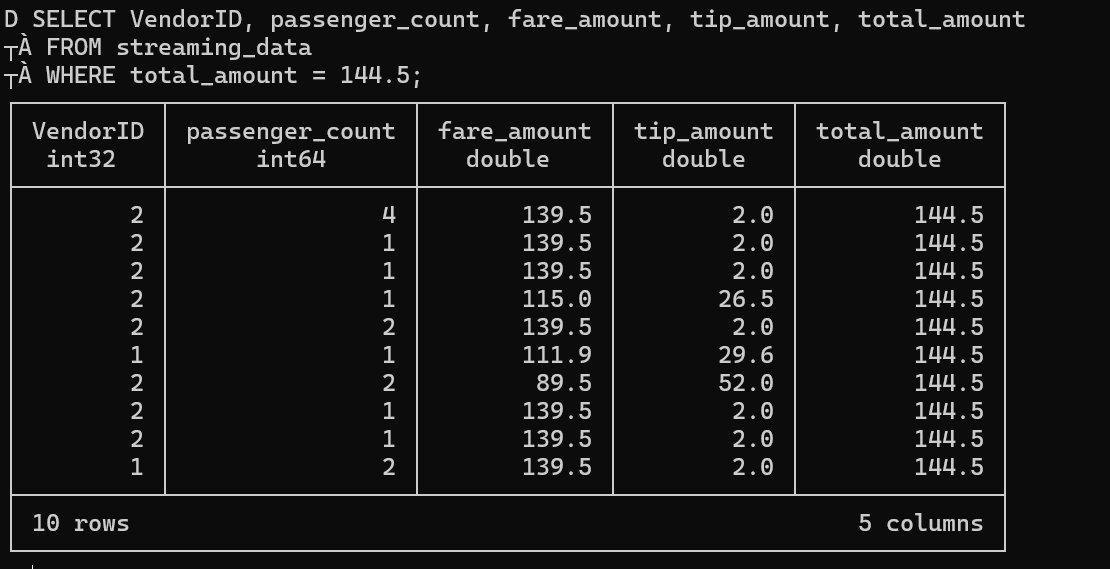
DuckLake allows you to read and update column values just like in a traditional database. Let's walk through a practical scenario: imagine we discovered that some tip amounts were incorrectly calculated and need to be adjusted. We want to find records where total_amount = 144.5 and increase the tip amount by $2.
• Before Update - Checking records where total_amount = 144.5:
• Updating Values - Setting tip_amount = tip_amount + 2:
• After Update - Verifying the changes:
Look at DuckLake Snapshots
DuckLake's snapshot system tracks every change to your data, providing a complete audit trail. We can query ducklake_snapshots to see the transactions we performed.

When we check the snapshots, we can see various changes in the changes column including:
schemas_createdtables_created table_inserted_intoHowever, these entries don't have significant meaning for tracking purposes because we can't see who made the changes or why they were made. Notice that author, commit_message, and commit_extra_info are all null , this is because these weren't formal transactions but just normal queries.
• Time Travel - Viewing Specific Versions
DuckLake supports time travel functionality, allowing you to query data as it existed at specific versions. For example, after our update we're now at version 6. We can run a SELECT to see the content at that specific version:
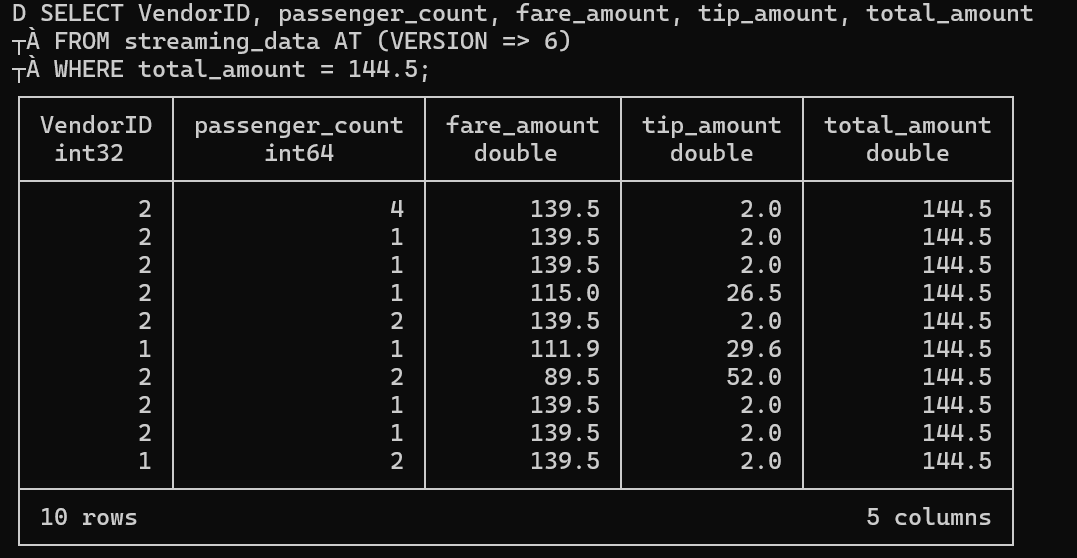
Using FROM streaming_data AT (version => 6) allows us to access the exact state of our data at that point in time.
Create and Drop New Column for a Table
One of DuckLake's powerful features is schema evolution. You can modify your table structure without breaking existing queries or data. In this section, we're experimenting with different column operations, adding columns with no default value, adding columns with default values, just to see what we're able to do and understand the capabilities.
• Adding Columns
We'll add a column named 'new_column' with type integer, and then preview that this column exists.

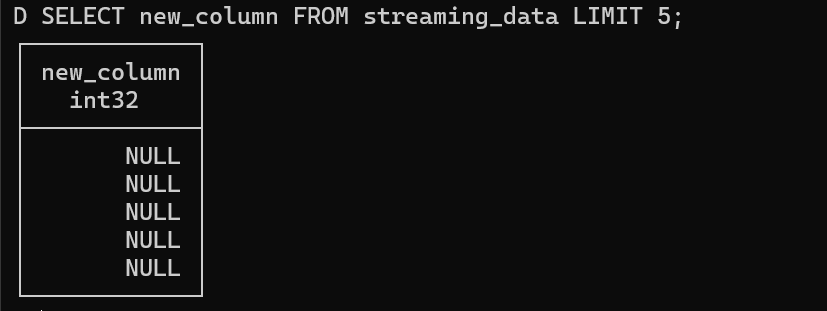
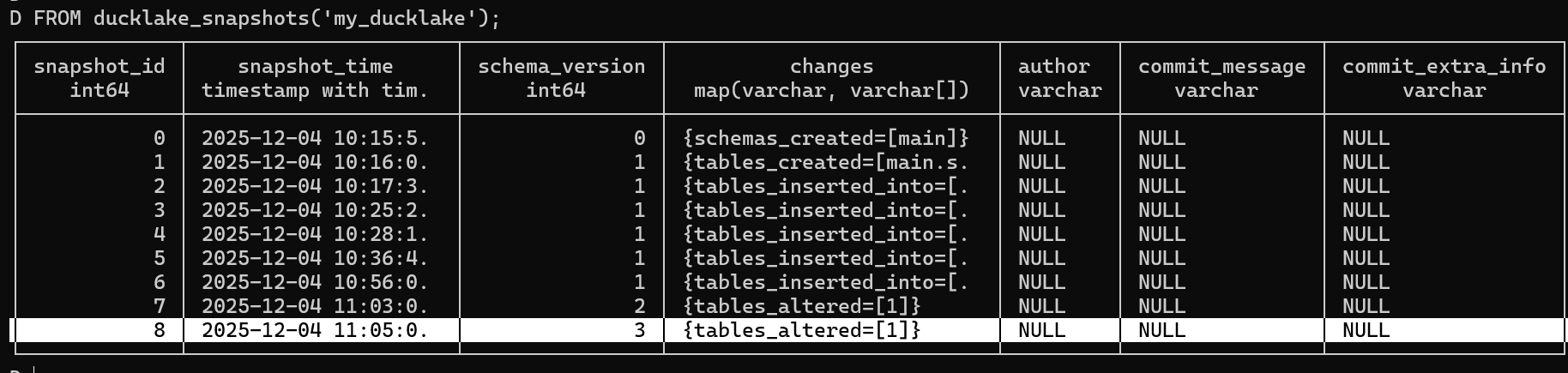
We can check the ducklake_snapshots to see how the table alteration is tracked:
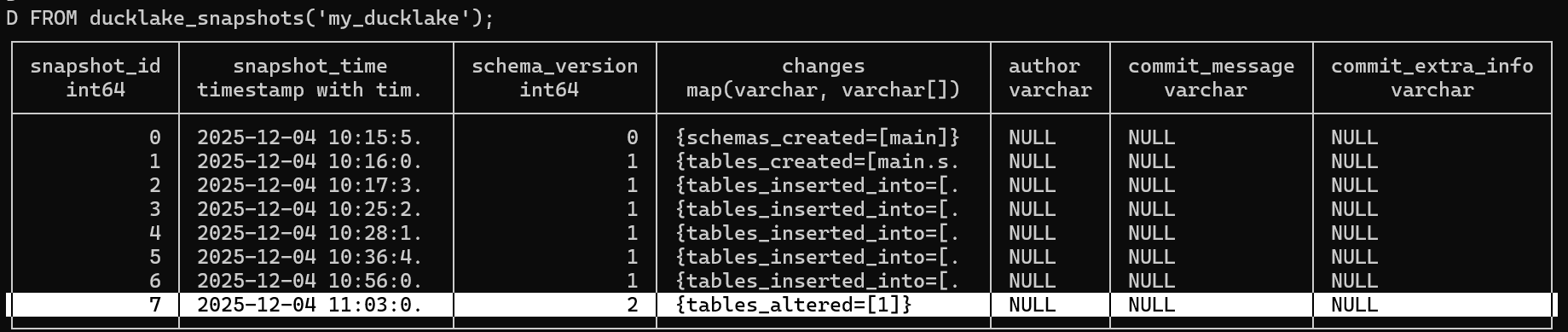
• Adding Column with Default Value
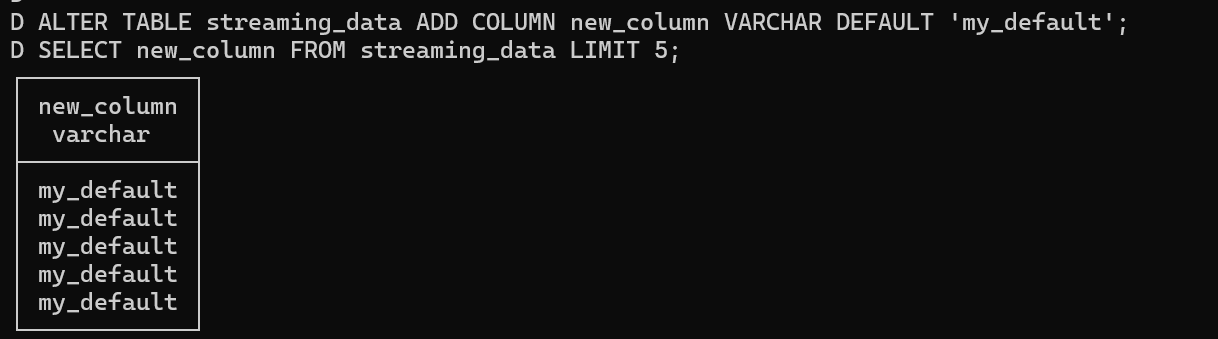
Now let's add another column with a default value 'my_default'. We'll also do a select to see the default value, but this is done in the simple way without transactions.
Again, we can check the ducklake_snapshots to see how this table alteration is recorded:
• Dropping Columns
Now we'll drop a column normally, then check its existence to verify the operation.

ACID Transactions and Commit Messages
DuckLake provides ACID transaction support with the ability to add commit messages, ensuring data consistency and providing clear audit trails. This is crucial for production data pipelines.
As we said before, the columns we added and the snapshots verification didn't give us anything relevant - like yes, we added columns, but what for? Without proper transaction context, these changes lack meaningful tracking.
• Transaction with Commit Message
Now we'll perform a big transaction: add new_col1_1 with default value 'my_default_2', and we'll call my_ducklake with commit message, author, and extra info.

Let's check ducklake_snapshots again to see the difference:
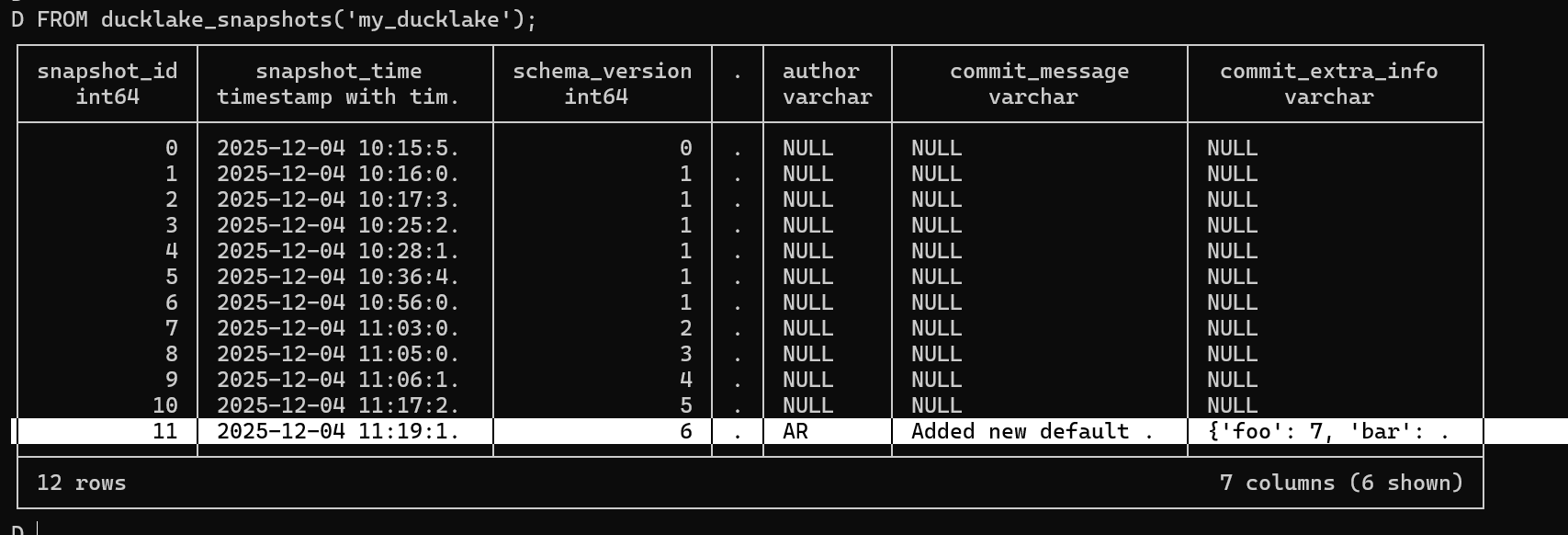
We can see this time the author, commit_message, and other metadata are properly populated! The transaction system ensures that your data operations are atomic, consistent, isolated, and durable, while commit messages provide context for each change.
Partitioning a DuckLake
Partitioning is essential for query performance at scale. DuckLake makes partitioning straightforward:
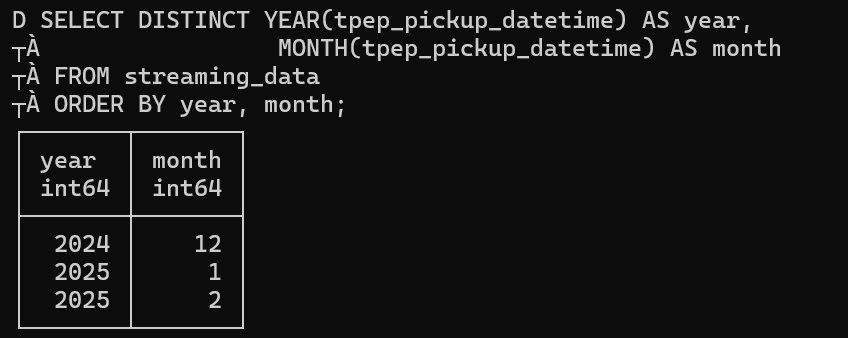
First, let's do a SELECT for year and month just to see if this dataset is able to be partitioned, it's just for testing. Indeed, we got 2 years (2024/2025) and 3 months (1/2/12):
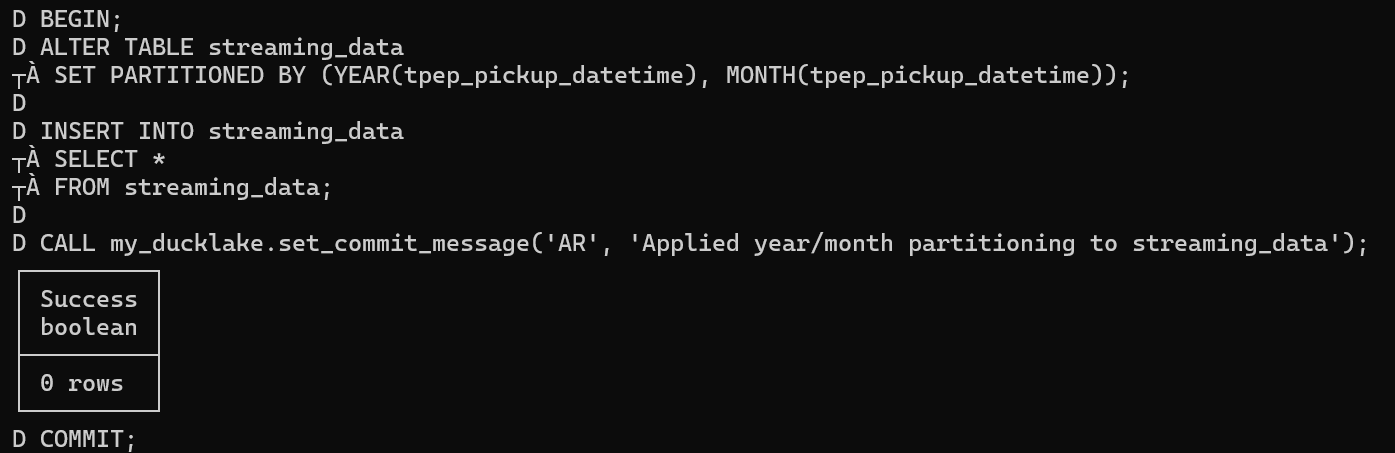
Next, we'll apply a transaction with commit message that applies year/month partitioning:
Now let's use PowerShell's Get-ChildItem to see the content of the 2 directories that were partitioned - 2 years and the content for each with the parquet files they contain:
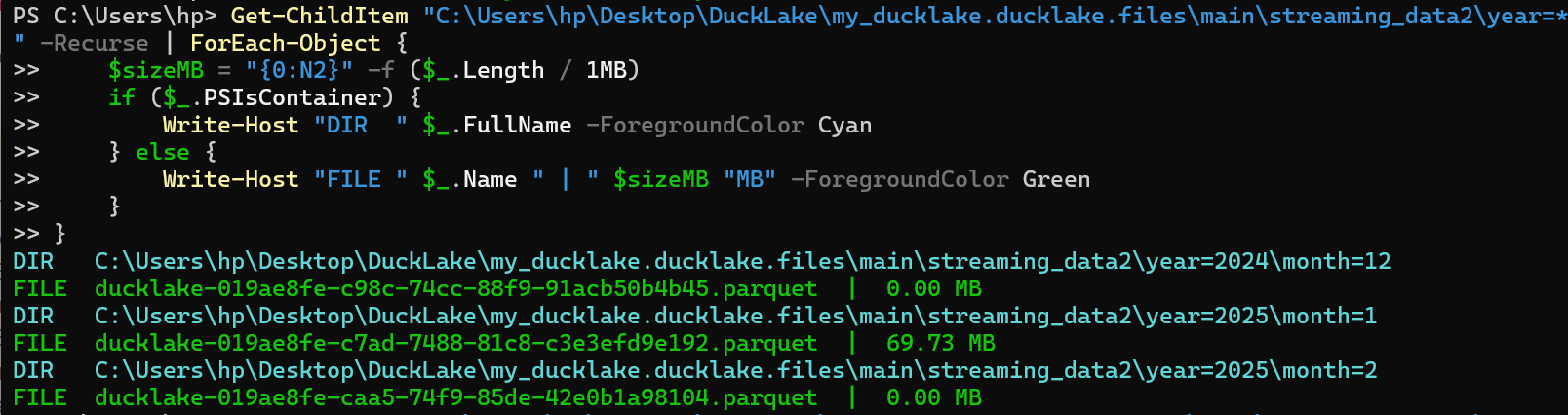
Finally, checking the ducklake snapshots, we can see the author and commit message which shows "applied year/month partitioning":
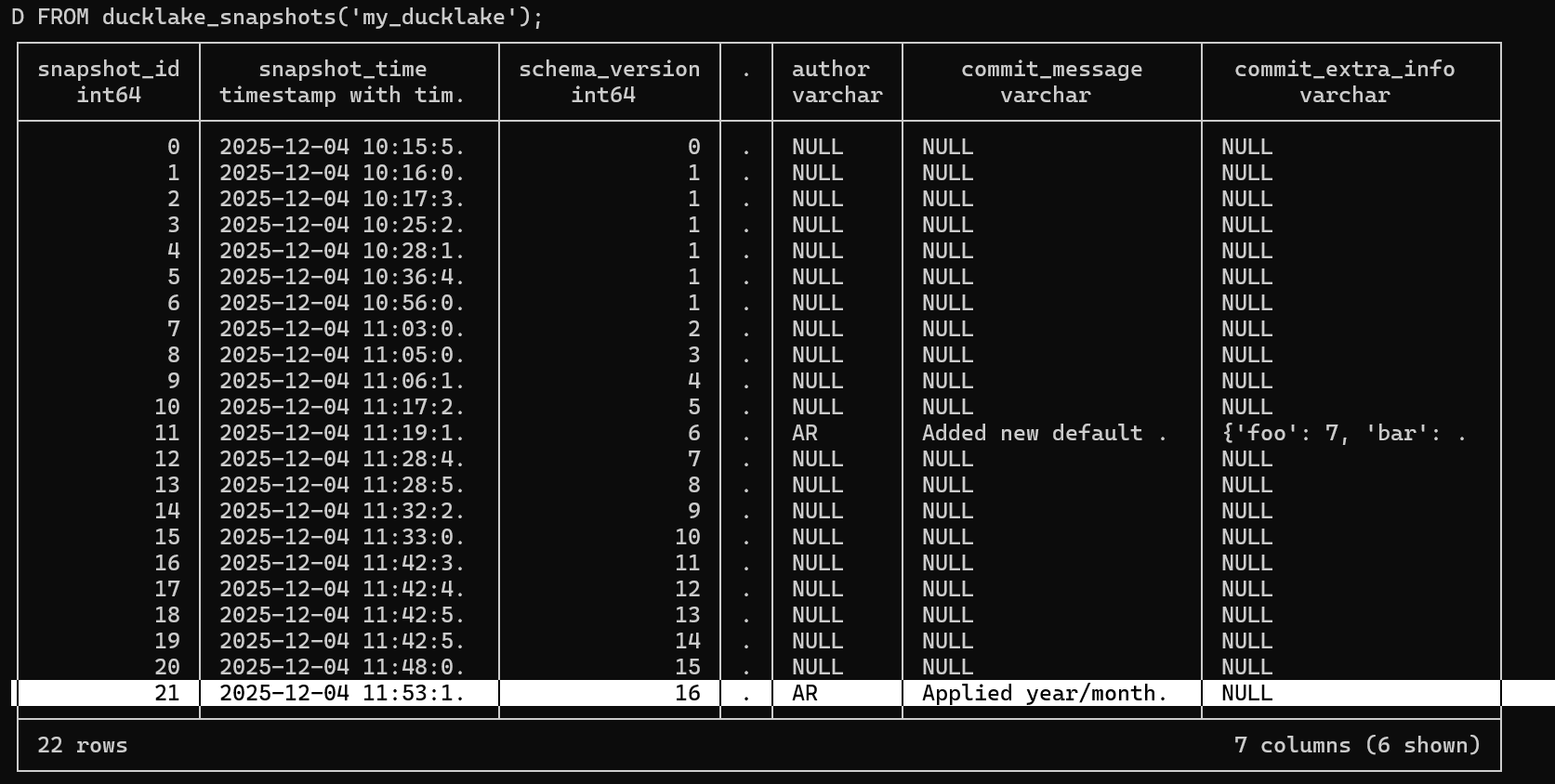
The partitioned data structure improves query performance by allowing the engine to skip irrelevant partitions.
Metadata Management: Comments and Documentation
DuckLake supports comprehensive metadata management through table and column comments.
• Table Comments
Adding comments to tables helps document your data for better collaboration and understanding.
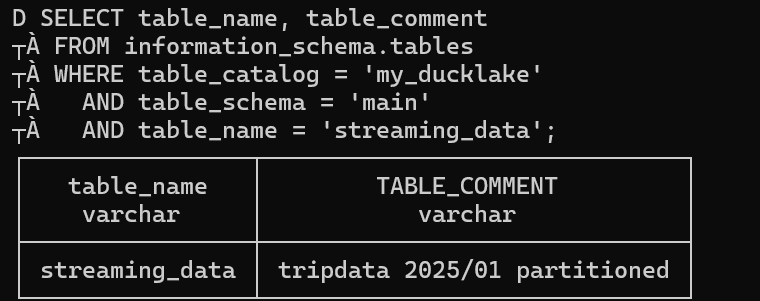
Here we use COMMENT ON TABLE to add descriptive metadata to our table.

Using SELECT table_name, table_comment we can see our comment "tripdata 2025/01 partitioned". Comments serve as essential documentation for other team members who want to understand the table's purpose, data source, or any specific considerations when using this table.
• Column Comments
You can also document individual columns to provide specific guidance on their usage.
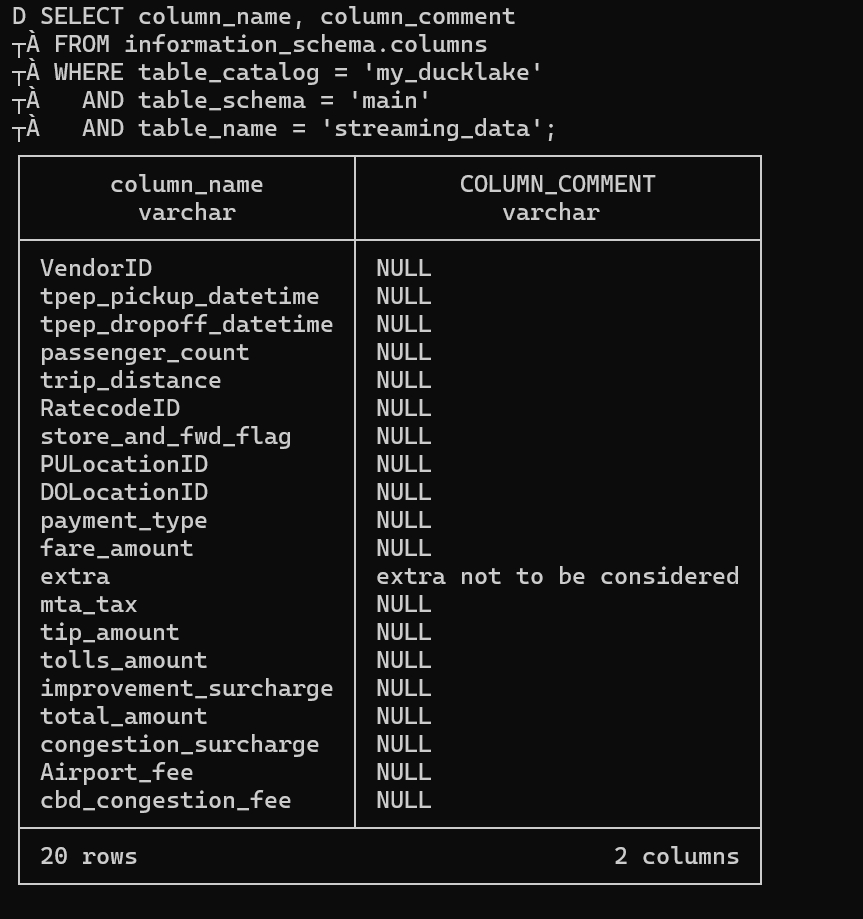
Here we use COMMENT ON COLUMN on the "extra" column with the comment "extra not to be considered".

Using SELECT column_name, column_comment for all columns shows that others are NULL because we only added a comment to one column. Column comments help other users understand what each field contains, any data quality issues, or specific business rules that apply to that column.
Other Advanced Features
We've talked about partitioning, comments, and transactions - here are some other advanced features that DuckLake offers:
• Views
Views can be created using the standard CREATE VIEW syntax. The views are stored in the metadata, in the ducklake_view table.
Example:
Create a view:
CREATE VIEW v1 AS SELECT * FROM tbl;• Constraints
DuckLake has limited support for constraints. The only constraint type that is currently supported is NOT NULL. It does not support PRIMARY KEY, FOREIGN KEY, UNIQUE or CHECK constraints.
Examples:
Define a column as not accepting NULL values using the NOT NULL constraint:
CREATE TABLE tbl (col INTEGER NOT NULL);Add a NOT NULL constraint to an existing column of an existing table:
ALTER TABLE tbl ALTER col SET NOT NULL;Drop a NOT NULL constraint from a table:
ALTER TABLE tbl ALTER col DROP NOT NULL;• Encryption
DuckLake supports an encrypted mode. In this mode, all files that are written to the data directory are encrypted using Parquet encryption. In order to use this mode, the ENCRYPTED flag must be passed when initializing the DuckLake catalog:
ATTACH 'ducklake:encrypted.ducklake'
    (DATA_PATH 'untrusted_location/', ENCRYPTED);
These encryption features ensure your sensitive data remains protected while maintaining performance.
Maintenance
• Expire Snapshots
DuckLake in normal operation never removes any data, even when tables are dropped or data is deleted. Due to time travel, the removed data is still accessible.
Data can only be physically removed from DuckLake by expiring snapshots that refer to the old data. This can be done using the ducklake_expire_snapshots function.
Usage:
Expire a snapshot with a specific snapshot ID:
CALL ducklake_expire_snapshots('my_ducklake', versions => [2]);Expire snapshots older than a week:
CALL ducklake_expire_snapshots('my_ducklake', older_than => now() - INTERVAL '1 week');Perform a dry run (only lists snapshots to be deleted without actually deleting them):
CALL ducklake_expire_snapshots('my_ducklake', dry_run => true, older_than => now() - INTERVAL '1 week');Set a DuckLake option to expire snapshots for the whole catalog:
CALL ducklake.set_option('expire_older_than', '1 month');• Cleaning Up Files
Note that expiring snapshots does not immediately delete files that are no longer referenced. See the cleanup old files section on how to trigger a cleanup of these files.
Why Choose DuckLake?
DuckLake stands out in the lakehouse landscape because:
Simplicity: No complex infrastructure or separate catalog services
Performance: Built on DuckDB's lightning-fast analytics engine
Compatibility: Works with standard Parquet files and SQL
ACID Compliance: Ensures data consistency and reliability
Cost-Effective: Minimal operational overhead
Getting Started
Ready to build your own lakehouse? Here's what you need:
Resources
DuckLake proves that building a modern data lakehouse doesn't require complex infrastructure. With just Parquet files and DuckDB, you can create a powerful, scalable data platform that grows with your needs.